Preparing Your Office for the December Shutdown: A Security and IT Checklist
What you do in November decides how you reopen your office in the new year.
For most South African businesses, December means two or three weeks of locked doors, empty desks, and systems that keep running without proper monitoring. During this quiet period, small problems often become costly. Failed backups go unnoticed; power surges can take out server rooms; an unarmed alarm zone gives thieves an easy way in.
The good news? Most shutdown problems can be prevented with a bit of planning. Below is a practical checklist covering both IT and physical security. We've also included a one-page version you can print and work through with your team before the last day of the year.
Understanding how physical security is becoming part of the IT business model is the first step to protecting both over the break.
Why shutdown prep matters more than people think
An empty office poses a different risk than a busy one. Throughout the year, issues can be resolved fast because someone is always there. In December, a fault can sit for weeks before anyone notices.
Three things make the shutdown period riskier:
- Nobody is watching: Alerts go to inboxes that won't be opened until January, and a blinking warning light on a server goes unseen.
- Criminals know the calendar: Empty business parks and quiet streets make the festive season a target for break-ins, theft, and opportunistic cyberattacks.
- Support is harder to reach: Many suppliers run reduced teams over the holidays. If something breaks on the 23rd of December, no one is there to fix it.
The cost isn't only the damage itself, but the time spent restoring files, replacing equipment, and calling suppliers, instead of getting back to business. Planning now is much cheaper than reacting later.
The IT side: backups, access, and monitoring
Your systems don't take a holiday, so they need to be set up to look after themselves.
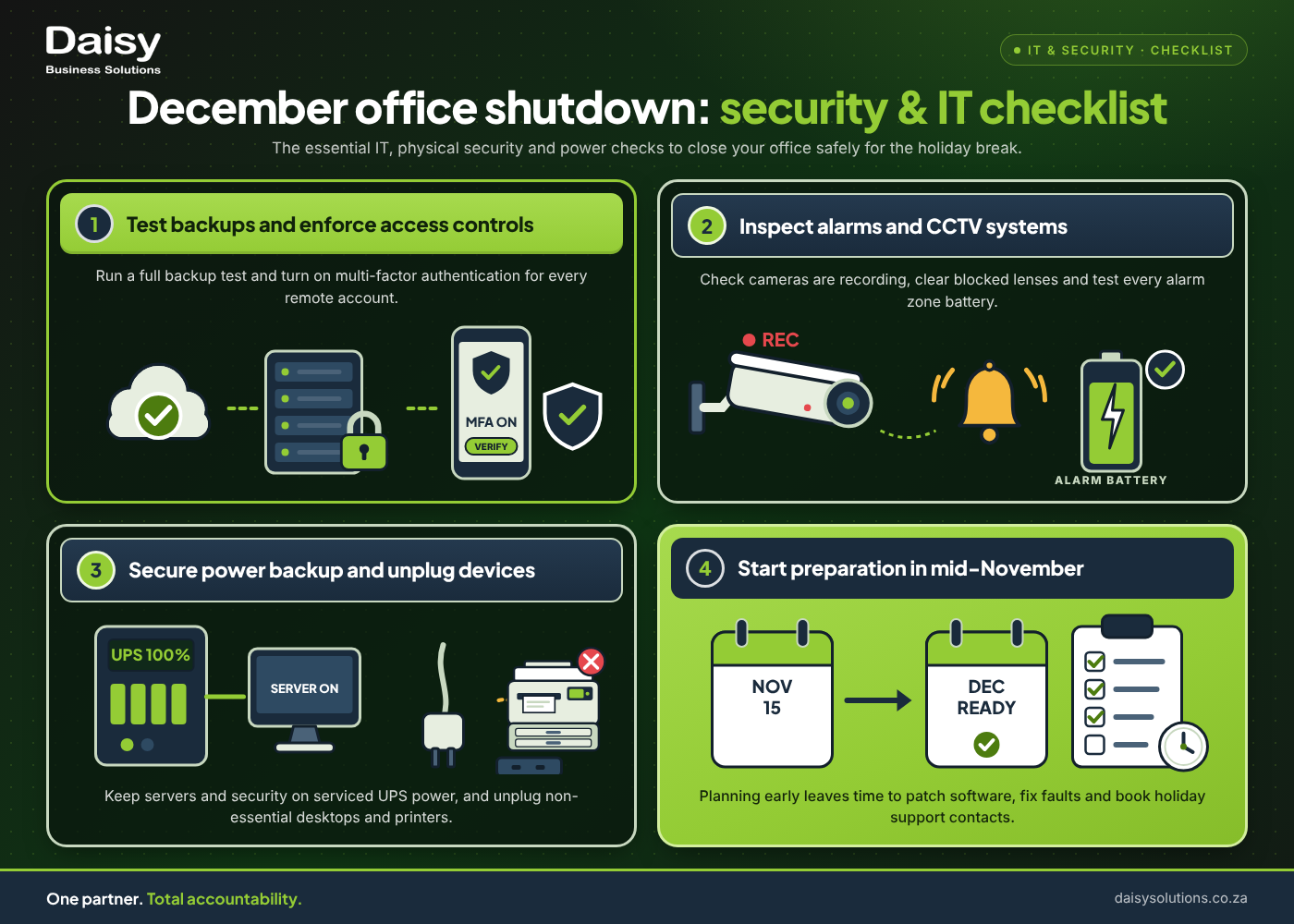
- 1Run a full backup, then test it: A backup you've never restored is a problem waiting to happen. Run a full backup of your business's servers, shared drives, and key cloud data, then restore a few files to confirm it works. Read: data backup strategies for ensuring integrity and recovery.
- 2Install updates before you leave: Apply outstanding operating system, firewall and software updates in November, while your team is still around to work through any issues. Don't schedule major updates to run unattended over the break.
- 3Review who has access: Remove accounts for staff who have left, go over temporary contractor logins, and confirm that remote access (VPN) is limited to the people who genuinely need it over December.
- 4Switch on multi-factor authentication: Email and remote-access accounts are the most common way in for attackers. This makes multi-factor authentication all the more important, as an added layer of security against phishing and stolen passwords.
- 5Decide what stays on and what goes off: Your business may need certain servers, firewalls, and network equipment to stay running in December. Desktops, monitors and other devices can usually be shut down and unplugged.
- 6Make sure someone is watching: Confirm who is responsible for acting on system alerts during the shutdown. If you use a managed IT provider, check their holiday support hours and escalation contacts now, not on 20 December.
For the disaster recovery side of the break, see our year-end IT shutdown and disaster recovery checklist.
The security side: alarms, CCTV and access control
These checks make an empty building hard to target.
- 1Test every alarm zone: Walk the building with your alarm company or security provider and trigger each zone. Replace weak batteries in sensors and panels, and update the call-out list so the right people get the call, not someone who's on leave.
- 2Check your CCTV is recording, not just running: Cameras that show a live picture aren't always saving footage. Confirm recordings are being stored, check how many days of footage your system keeps, and make sure you can view cameras remotely from a phone.
- 3Clean and reposition cameras: Remove any dust, spider webs, and foliage growth that is blocking camera views. Make sure entrances, parking areas, stock rooms and server rooms are covered.
- 4Tighten access control: Cancel cards and fobs for staff who have left, limit access for anyone who doesn't need to come in during December, and review your access logs after the break.
- 5Secure what's valuable: Lock laptops, stock and documents away, and keep them out of sight from windows. Document the serial numbers of key equipment in case of theft.
- 6Develop a site-visit plan: Decide who will check on the premises during the shutdown, how often, and what they should look for.
Don't forget power and print
These are two areas that often get missed:
- Power protection: Summer storms and power outages can damage equipment that stays on over the break. Check that servers, network gear, and security systems are on a working UPS, and that backup batteries or generators have been serviced. Your alarm and cameras only work if they stay powered.
- Printers and multifunction devices: Modern MFPs are networked devices that store scanned and printed documents. Clear any documents left in print queues or on the device, switch off devices that don't need to run, and make sure the firmware is up to date.
Your one-page December shutdown checklist
Print this out and tick it off before your last day.
IT
- Full backup completed and a test restore done
- Off-site or cloud copy of backups confirmed
- Operating system, firewall and software updates installed
- Old and temporary user accounts removed
- Remote access limited to essential people
- Multi-factor authentication on for email and VPN
- Non-essential devices shut down and unplugged
- Alert recipients and holiday support contacts confirmed
Security
- Every alarm zone tested and batteries checked
- Alarm call-out list updated
- CCTV recording and remote viewing confirmed
- Cameras cleaned and views unblocked
- Access cards and fobs for leavers cancelled
- Valuables locked away and out of sight
- Site-visit schedule confirmed
Power and print
- UPS, batteries and generator checked
- Print queues cleared and printers switched off
- Printer firmware updated
Frequently asked questions
When should I start preparing my office for the December shutdown?
Start in mid-November. This ensures enough time to install updates, fix any faults, and book suppliers before their own holiday schedules fill up.
Should I switch off all IT equipment over December?
No. Switch off and unplug desktops, monitors and printers, but keep servers, firewalls, network equipment, alarms and CCTV running on protected power.
What is the most important thing to check before closing?
Your backup. If everything else goes wrong, a tested backup is what gets your business running again in January.
Close the year with one less thing to worry about
You don't have to work through this list alone. Daisy's technicians help businesses across South Africa get ready for the shutdown every year, from backups and firewalls to alarms, comprehensive CCTV solutions, and power protection. Prevent cybersecurity blind spots in your business, even during the shutdown period.
Because Daisy handles IT, security, print and power under one contract, you have one team to call and one partner checking that nothing has been missed. With a national branch network, the people who install your systems are the same people who support them.
Call 087 056 0744 or book a no-obligation audit before your last day of the year.
Want to solve your IT Managed Services challenges?
Daisy provides end-to-end it managed services solutions tailored for South African businesses. One SLA, one partner.

Dylan Gordon
Dylan Gordon writes on IT Managed Services for Daisy Business Solutions, the South African technology partner that connects, secures, powers and finances businesses under one SLA across eight divisions.